 |
| The objective of LinuxPCRobot.org is to build a fully functional robotic development platform for $500 or less using linux, commonly available components, a little skill, and some good old fashioned scrounging. |
Why is it Obsolete? You Just Did Some Work on It! Why So Long Between Posts
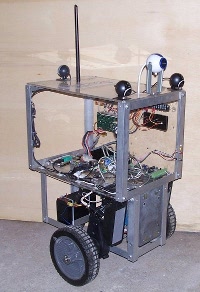
Submitted by mohawk software on Tue, 2013-07-16 15:02These questions are best answered by answering the unsaid question first: "What is the Linux PC Robot?" It is a hobby robot platform that you can build without a lot of specialized components, with few (if any) specialized programing languages, and that has the ability to do real mobile robotics work, for under $500.
LPCR (Linux PC Robot) Obsolete?
Submitted by mohawk software on Sun, 2013-06-23 12:49I think LPCR's useful life has come to an end. The Raspberry PI and Arduino are really coming into their own. I believe that using an Intel based platform with ATX power is probably not something you would design today. The LPCR has had a good run, and its been a fun project, but with all things its time to step back and re-evaluate th future.
Message based and shared memory control interface is mostly complete
Submitted by mohawk software on Wed, 2012-11-28 18:31The message based control path is complete. The network joystick implementation is completely in the joysender program and out of the robot proper. The "planner" concept is obsolete. There is now simply a motor planner that responds to commands. All planning and control is assumed to operate in a separate process on or off the robot system.
Changing plumbing on robot
Submitted by mohawk software on Tue, 2012-11-13 04:34Currently, the only way to control the robot or alter its behavior is by a script, pretend to be a joystick, or modify the robot program itself. All of which I have done as needed. I gets pretty tedious and frustrating to do interesting things when you have to modify and recompile a "working" robot program, each and every time, to do something different.
Therefor, what is being done is to scrap the "netstick" networked joystick and move it to a more generic message passing interface. The networked joystick will still work, but it will communicate through the new interface.
Big Robot or Little Robot?
Submitted by mohawk software on Sat, 2012-11-10 20:05I am working on a "design guide" on how to build your own Linux PC Robot and I think something needs to be stated up front. This is not a "small robot." I have nothing against small robots like Lego NXT and Roombas, they are cool.
Design Guide and Source Bundle Coming
Submitted by mohawk software on Mon, 2012-11-05 04:11I have given presentations about this robot several times over the last few years. From IEEE conferences to USENIX, including a 1st grade class in Milton, Massachusetts. I have mostly been focusing about the "why" and history of the Linux PC Robot (LPCR) and only tangentially touching on the technical details.
